PLAYECOM · APP FOR SHOPIFY
Google Shopping feed with PIX price and installment options
Configure your XML feed for Google Merchant Center with the Playecom Merchant Optimizer. Organize your Shopify store's products, variants, prices, and attributes, with attention to the PIX and installment payment conditions of your operation in Brazil.
Check the plans, requirements, and permissions on the Shopify App Store.
FEED DE PRODUTOS PARA SHOPIFY
Your Shopify catalog, prepared for Google Merchant Center
When your store works with cash prices via PIX and installment options, this information needs to be handled carefully in your feed configuration. It is not enough to simply calculate a lower price: the data sent must represent a real offer that is consistent with the shopping experience.
Playecom Merchant Optimizer brings together XML feed preparation and attribute mapping in a tool designed for Shopify. You review the output before using it as a data source in Google Merchant Center, without modifying the original catalog or creating discounts at checkout.
RECURSOS DO APP
More control over your feed information
XML feed for Google
Transform Shopify product and variant data into an XML feed for Google Merchant Center, with a custom URL to set up your data source.
PIX price in the feed
Configure how the discount offered for PIX will be represented in the feed. Use conditions already available in your store and validate price consistency.
Installment information
Provide the installment payment terms in the feed. The number and amount of installments must match the offer the customer finds in the store.
Products and variants
Organize catalog information, including variants, pricing, and availability, to prepare the data sent to Merchant Center.
Attribute mapping
Map your store data to the feed attributes. Review the essential information to present your catalog more clearly.
Preview before publication
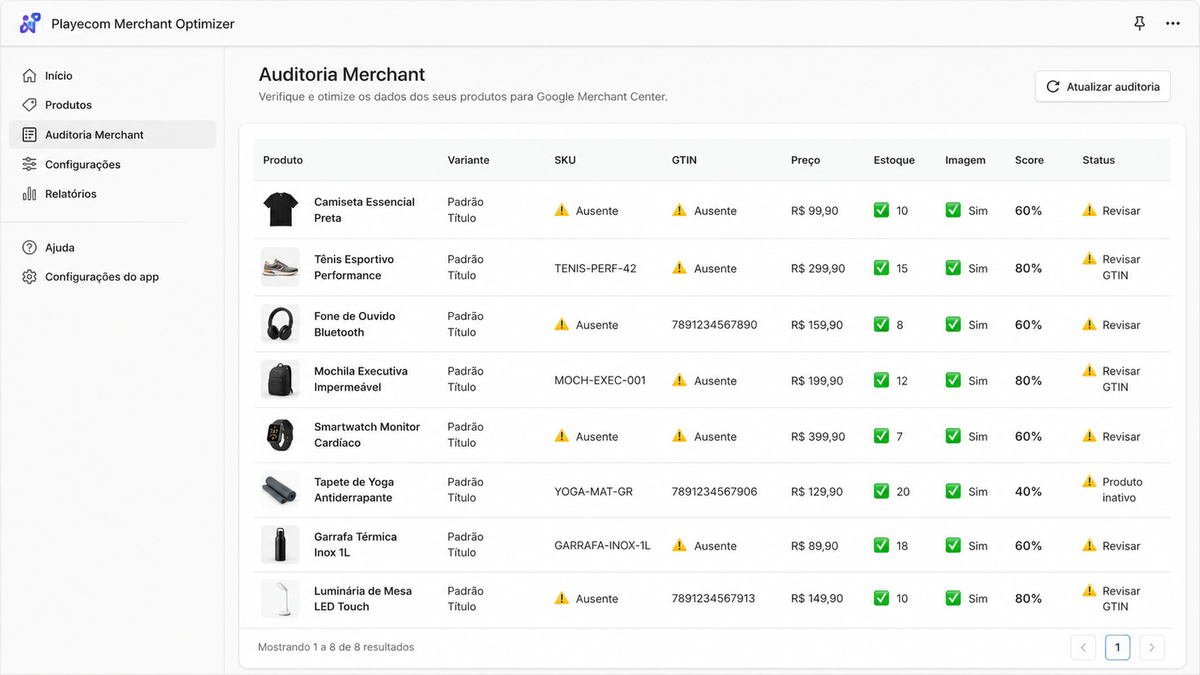
Check the feed output before using it in Google Merchant Center. Review the fields and settings without changing the products in Shopify.
PREÇOS NO FEED
PIX and installments: communicate your store's actual terms
Price and discount indicated for PIX. Configure the representation of values in the feed according to the conditions available to the buyer. The payment condition must exist in the store: the app does not function as a gateway or a discount creator.
Installments. Organize the installment information so that the data sent reflects the commercial offer. Review the number and value of the installments, the product page, and the checkout before publishing the feed.
Configure a representação de preços, PIX e parcelamento no feed XML.
Mantenha a oferta válida na página do produto e no checkout.
Confira o processamento e os diagnósticos no Merchant Center.
Submitting the feed does not guarantee approval, positioning, or the display of prices and installments. Products and offers are subject to Google's review and policies.
COMO FUNCIONA
How to set up your product feed
-
Meet and install the app
Access the listing on the Shopify App Store, check the plans, requirements, and permissions, and follow the installation flow in your store.
-
Configure the feed data
Define the pricing, PIX, and installment rules according to your operation. Map the attributes and review the products and variants.
-
Check the preview and the URL
Validate the values and information generated. Use the dedicated feed URL to configure the data source in Google Merchant Center.
-
Monitor Merchant Center
Check the data source processing and product diagnostics. Correct any discrepancies between the feed, product page, and checkout.
Para lojistas, gestores de e-commerce e agências
Uma opção para quem precisa configurar o feed de uma loja Shopify com atenção às condições comerciais brasileiras. O foco é a preparação dos dados do catálogo; a gestão de campanhas, a aprovação dos produtos e os ajustes no checkout são etapas separadas.
PERGUNTAS FREQUENTES
Questions about feed, PIX, and Google Shopping
What is Playecom Merchant Optimizer?
It is a Shopify app that generates and allows the configuration of an XML product feed for Google Merchant Center. The focus is on organizing catalog data and the representation of prices, discounts for PIX payments, installment plans, and attributes.
Does the app create the PIX discount at checkout?
No. The app informs the discount configured for PIX in the feed; it does not create the payment condition or apply discounts at checkout. The price and purchase conditions must be available in your store.
Will the PIX price automatically appear on Google Shopping?
There is no guarantee of display. The app prepares the feed data, while the processing, product approval, and presentation of offers depend on Google and its policies. Review the offer eligibility and price matching in the store.
How does installment payment work in the feed?
You configure the installment representation according to your store's conditions. This data does not create financing or change the payment method. Before publishing, check the number and amount of installments and Google's requirements for your market.
Does the app change my products on Shopify?
The app's job is to prepare the feed. It does not alter the Shopify product catalog or create discounts at checkout. Changes that need to be made to the storefront or payment must be handled separately.
How do I use the feed URL in Merchant Center?
After reviewing the settings and the preview, use the dedicated URL provided by the app when setting up your data source in Google Merchant Center. Monitor the processing and diagnostics to verify that the products have been accepted.
I already have a product integration. What should I review?
Before adding another data source, review how your operation sends products to Merchant Center. Define which integration will be responsible for each piece of information and validate the configuration to avoid conflicting data.
Where can I check the plans and install the app?
Visit the Playecom Merchant Optimizer page on the Shopify App Store. The buttons on this page lead to the app listing, where you can check the current terms and start the installation.
Referências para validar sua operação: requisitos de preço e requisitos de parcelamento do Google Merchant Center.
Prepare your feed for the Brazilian market
Discover the Playecom Merchant Optimizer and learn how to configure your Shopify store data for Google Merchant Center, including PIX pricing, installments, and product attributes.
Check the plans, requirements, and permissions on the Shopify App Store.
Playecom Merchant Optimizer · Playecom